Safari 4 just came out of beta. I gave it a try at my work computer (a Windows XP machine) just to go back to Chrome shortly after. Now I’m back with Safari. The main reason? Text rendering. See, in Safari you can configure the browser to render its text like Mac OS X does. In my opinion, text looks a lot better in Mac OS X than it does in Windows. Sure, it’s a matter of taste; my excellent taste versus other people’s terrible taste.
To illustrate my point, I took a screenshot of the Facebook homepage. Why? Because it shows text in the English, Hebrew, and Arabic alphabet. You’ll see how Safari’s text looks much better. From left to right: Apple Safari 4, Google Chrome 2.0, Mozilla Firefox 3.0,and MS Internet Explorer 7.0:
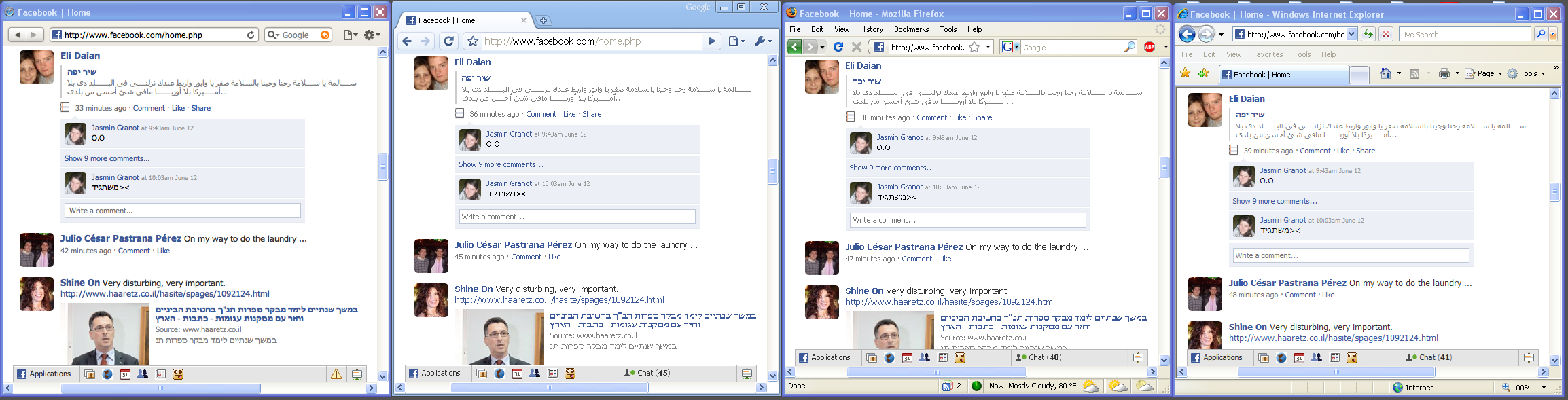
What do you think? Which one do you like better?
n
One thought on “Browser comparison”